
Generative AI is now part of everyday marketing. Whether drafting a blog, refining ad copy, summarizing documents, or organizing ideas, tools like ChatGPT and Claude have become familiar.
But go one step further, and some unfamiliar terms start to appear.
API, API key, OpenRouter. Suddenly, it starts to feel like developer territory.
| “Do marketers really need to know this?”
The short answer is no. If you’re writing a blog or developing ideas, a chatbot may still be the simplest option.
But if these situations keep coming up, that’s a different story.
✅ Comparing GPT, Claude, and Gemini with the same prompt.
✅ Using the same data each week to create the same output다.
✅ Analyzing customer inquiries or survey responses, then moving results to a spreadsheet.
✅ Classifying hundreds of keywords using the same criteria.
You’re using AI well, but using AI has become repetitive work itself. That’s where an API comes in.

Say you receive 300 open-ended responses from a post-event survey. You need to classify them as positive, negative, or neutral and identify the main complaints.
A chatbot can do this. Copy in some responses and ask:
| “Classify these responses as positive, negative, or neutral, and summarize the key feedback.”
That works.
The problem is splitting 300 responses into batches. Run the same survey next month, and you have to do it all again. An API can change that.
Pull responses from a spreadsheet → send them to AI with a set prompt → write the results back to the sheet. No manual copying and pasting.
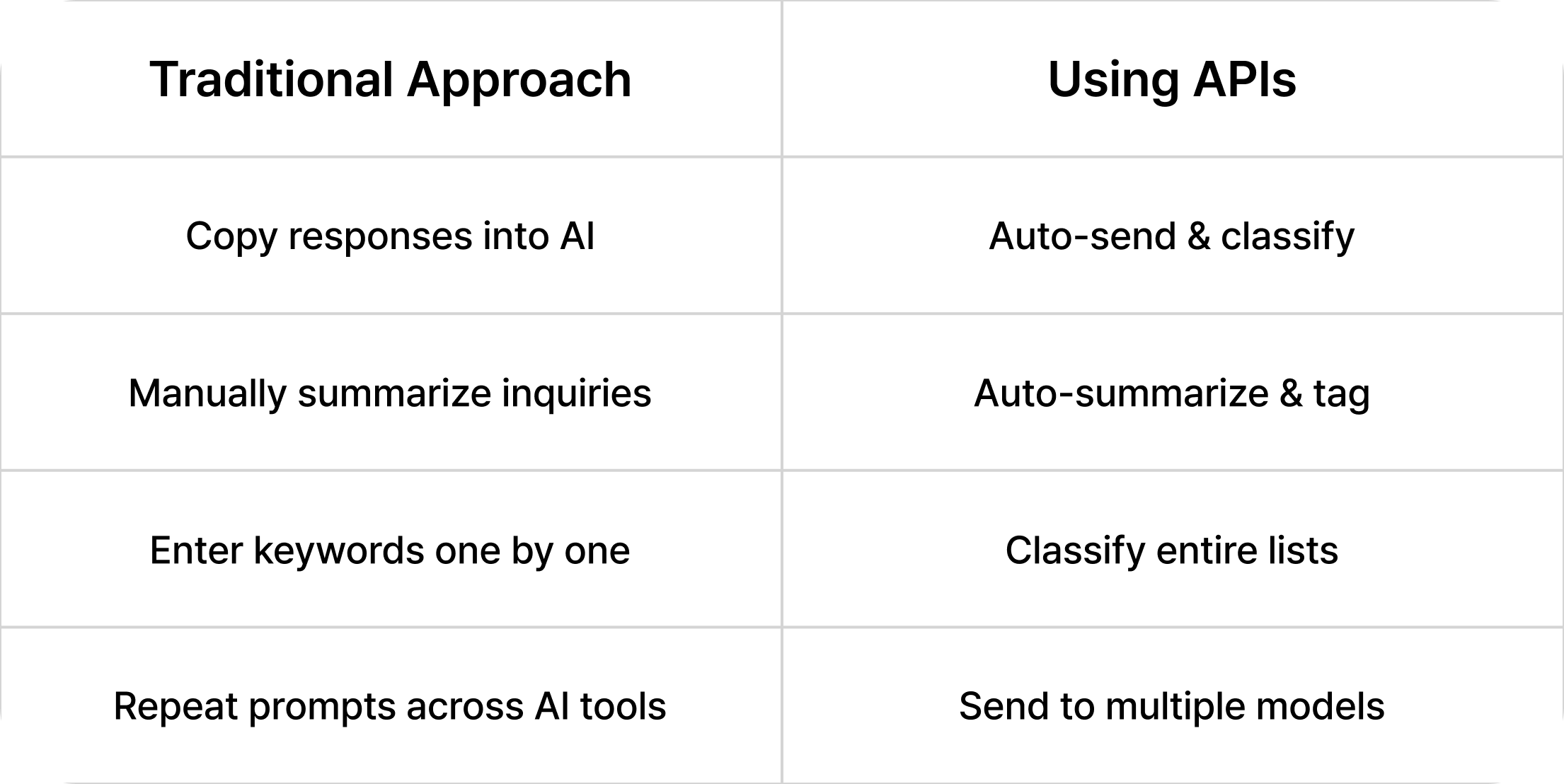
In short, an API doesn’t make AI smarter. It brings repetitive AI tasks into your workflow.
An API (Application Programming Interface) is simply a way for programs to exchange requests and results.
With a chatbot, you interact directly with AI.
| Chatbot = people talk to AI
With an API, another program like a spreadsheet, automation tool, or internal system talks to AI instead.
| API = programs talk to AI
An API key is an access pass that allows the program to use the AI service.
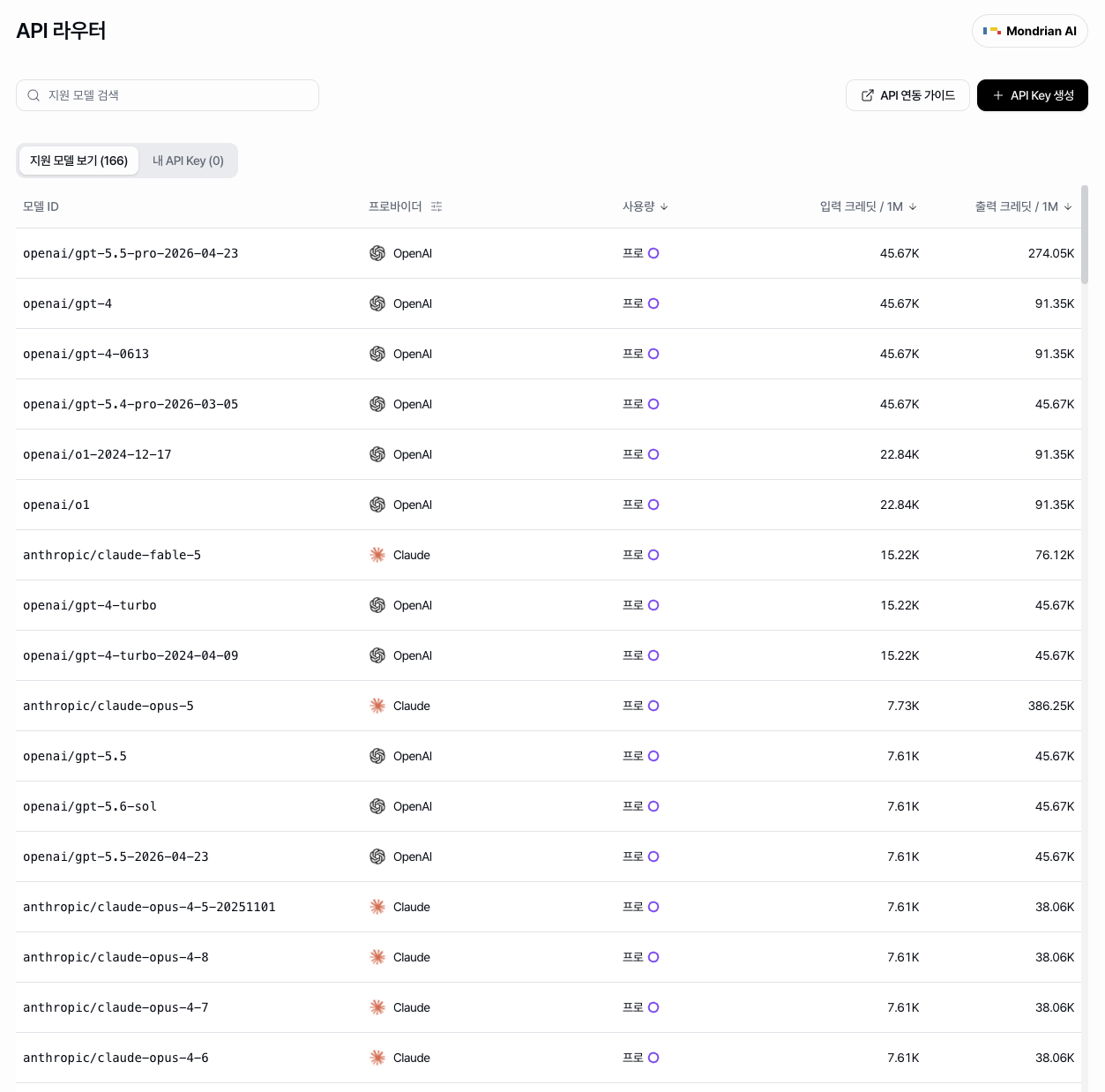
For example, connect an OpenAI API key to an automation tool, and it can send requests to OpenAI models on your behalf.
| “So do I need to know how to code?”
Not necessarily. No-code tools like Zapier and Make, along with spreadsheet extensions, can work with just an API key. APIs are now much more accessible without development experience.
There are three main cases.
Think of standardizing hundreds of product descriptions, categorizing reviews, or sorting SEO keywords by search intent. The input changes, but the process stays the same.
A chatbot works well for a few items. With dozens or hundreds, copying and pasting becomes work itself. That’s where APIs help.
For example:
| Customer inquiry → AI summary → classification → spreadsheet → team member
This lets data move through each step automatically. For marketing teams using forms, CRMs, email, spreadsheets, and collaboration tools, APIs can connect AI directly to existing workflows.
If the task relies on human judgment and ongoing conversation, an API may not be necessary.
No single AI model is best at everything. One may excel at long documents, while another may be better for brainstorming or coding.
You may want to compare the same request across GPT, Claude, Gemini, and other models. The more models you use, the more tedious it becomes to repeat the same prompt across services.
APIs let you handle those comparisons in one workflow.
APIs also bring a new challenge. OpenAI requires an OpenAI API key, Claude requires an Anthropic API key, and each provider has its own account and billing.
More models mean more accounts, API keys, payment methods, and usage to manage. It’s like carrying a different access pass and payment method for every AI service. One solution is OpenRouter.
OpenRouter connects models from multiple providers through one API. A single API key gives you access to different models, with payments handled through credits. It’s especially useful if you frequently compare or switch between models like GPT, Claude, and Gemini.
However, OpenRouter charges a platform fee on credit purchases. If you use one model at high volume, going directly through the provider may be more cost-effective.
For business use, security and privacy also matter. You need to consider where your data goes and how each provider handles.
Ultimately, OpenRouter isn’t for everyone. Its value depends on how often you work across multiple models.
For an individual marketer, OpenRouter and a no-code tool may be all you need.
But things change when every team member has their own API keys and payment methods.
Unlike a regular password, an API key is directly tied to usage costs. An exposed key can lead to unexpected charges, while a misconfigured automation can quickly drive up usage under pay-as-you-go pricing.
| “How much did we spend on AI this month?”
| “Which models does our team use most?”
| “Who’s using the most?”
| “How do we handle personal card expenses?”
What’s simple for one person becomes an operations issue for a team. Organizations need to consider more than just access to multiple models:
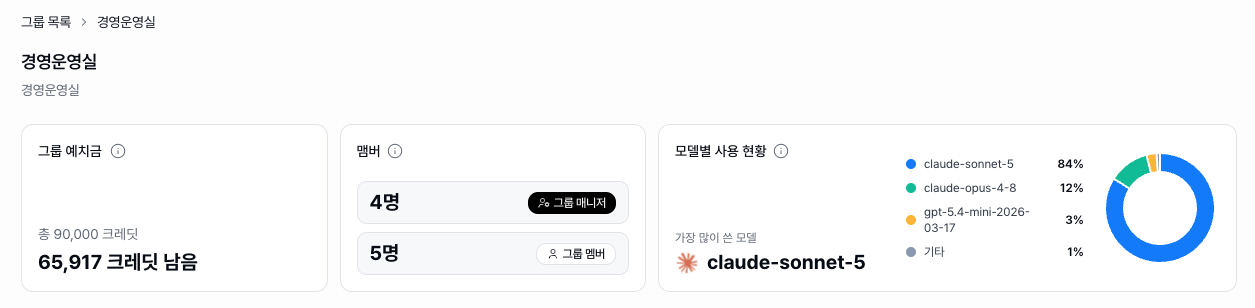
Mondrian AI’s Runyour Agent is designed for teams to use and manage multiple AI models at the organizational level.
API Router connects 85+ AI models through a single API key, reducing the need to manage separate keys for each provider. Payments can also be handled with one payment method and billing date, including tax invoice management.
Billing is based on actual token usage. Each API call records input and output tokens and credits used, making it easy to track where costs come from.
The dashboard tracks usage by model, team, and member. You can also set credit limits for each member to help prevent unexpected overuse.
Team members without development experience can also select and use different AI models directly from the interface, without working with APIs.
Developers can connect workflows through APIs, while marketers and planners use multiple models through a familiar interface, all while the organization manages AI usage and costs in one place.
APIs may sound like another technical skill to learn. But marketers don’t need to understand exactly how they work. A better question is:
| “What am I repeatedly doing just to use AI?”
If you’re copying the same data into AI every week or repeating the same prompt dozens of times, an API may be worth considering.
If your work is more about developing ideas through conversation, a regular chatbot may be much simpler.
API keys and OpenRouter are ultimately tools, not the goal. What matters is knowing when a chatbot is enough and when automation and APIs make more sense.
Once you find that line, you can move beyond simply “using AI well” and start letting AI handle repetitive work for you.
Not necessarily. A chatbot is enough for tasks like writing blogs or organizing ideas. But if you repeat the same tasks or need to connect AI with other tools, an API may be worth considering.
Yes. Many no-code tools and spreadsheet extensions work with just an API key. You’ll still need to define the basic workflow, such as what data to send and where to store the results.
Not necessarily. OpenRouter makes it easier to manage models and billing across providers, but it also charges a platform fee on credit purchases. If you use one model at high volume, compare it with using the provider’s API directly.


![[Runyour Cloud October Update] Efficient resource utilization with integrated MIG technology for GPU partitioning](https://cdn.prod.website-files.com/659faaa08c491caeb4e3f8a3/6ae7f5f5d3a8fbe029cfc8a5_%EC%A0%95%EC%82%AC%EA%B0%81_261026_%ED%81%B4%EB%9D%BC%EC%9A%B0%EB%93%9C%2010%EC%9B%94%20%EB%A6%B4%EB%A6%AC%EC%A6%88%202.png)
![[Runyour Cloud October Update] Monitor your organization's GPU usage at a glance with operational reports](https://cdn.prod.website-files.com/659faaa08c491caeb4e3f8a3/6ae7f5dcdd229cd3f4a5a094_%EC%A0%95%EC%82%AC%EA%B0%81_261026_%ED%81%B4%EB%9D%BC%EC%9A%B0%EB%93%9C%2010%EC%9B%94%20%EB%A6%B4%EB%A6%AC%EC%A6%88%201.png)
![[Runyour Agent October Update] Block sensitive information in advance and align AI models with organizational policies](https://cdn.prod.website-files.com/659faaa08c491caeb4e3f8a3/6ae7f554d5d7d3e0a4595c35_%EC%A0%95%EC%82%AC%EA%B0%81_261026_%EC%97%90%EC%9D%B4%EC%A0%84%ED%8A%B8%2010%EC%9B%94%20%EB%A6%B4%EB%A6%AC%EC%A6%88%202.png)