We are the Runyour team.
Imagine you are an enterprise or research institution opening your integrated dashboard and seeing GPU utilization at 95%.
While it may look like your expensive equipment is being put to good use without a break, it is difficult to be certain from a single number whether that capacity is actually being used for legitimate model training.
To achieve efficient, company-wide resource management, you need to look beyond simple usage metrics—how much is being used—and instead focus on: "Which tasks are occupying resources (what is running, and who launched it?)", and "Who has accessed the workspace (who logged in and what did they do?) "A multi-dimensional monitoring system capable of tracking these details is essential.

Traditional resource monitoring methods only provide numerical data on overall consumption, such as GPU/CPU utilization and disk capacity.
However, as an organization grows, static numbers alone make it difficult to identify the following operational risks:
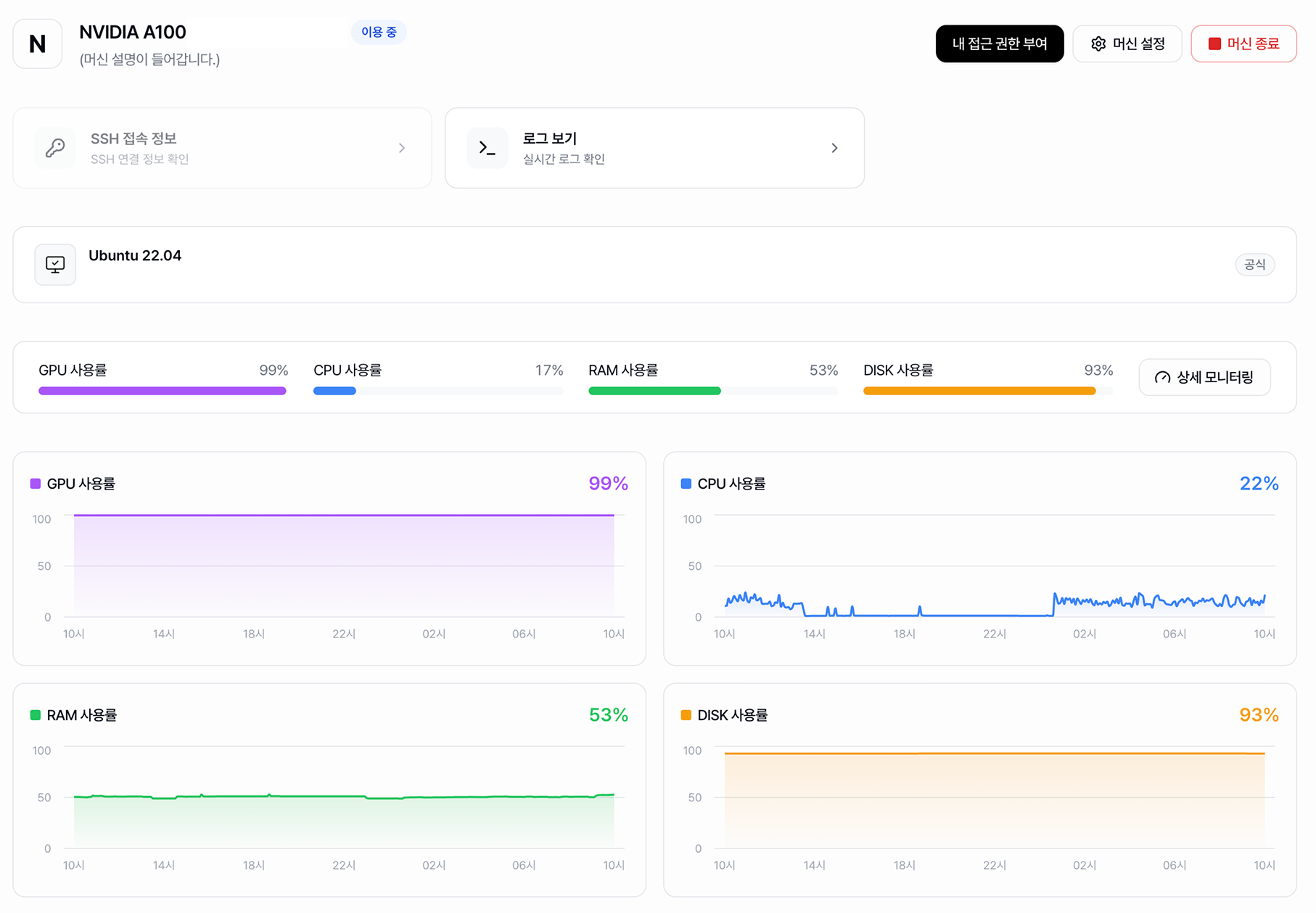
Runyour Cloud goes beyond simple resource status, providing a total of 26 server/machine monitoring items in a single console, including 12 resource monitoring metrics, 9 process monitoring metrics, and 5 security audit items. 26 server/machine monitoring items are provided in an integrated manner.
Through process monitoring, you can precisely track resource occupancy in real-time down to the individual process level running within your workspaces (Container/Bare-metal).
Large-scale AI infrastructure stores vast amounts of a company's core IP, including unreleased models, high-value training data, and key research outputs.
Runyour Cloud provides a transparent security audit system that allows you to monitor user information and suspicious access records in real time without complex security configurations.
Ultimately, successful AI infrastructure monitoring must provide clear answers to three core questions: "How much is being used (resources)?", "What is occupying the resources (processes)?", and "Who is accessing and working (security)?".
Runyour Cloud provides these three operational pillars in a single, unified management console.
Transform GPU utilization metrics from mere numbers into 26 precise data-driven monitoring metrics We will help large-scale organizations ensure their AI infrastructure always maintains peak operational efficiency and robust security.
.png)


.png)
![[Runyour Cloud 10월 업데이트] 낭비 없는 자원 활용, GPU를 쪼개 쓰는 MIG 기술 탑재](https://cdn.prod.website-files.com/659faaa08c491caeb4e3f8a3/6adf66337affbe765c4cdaa2_%EC%A0%95%EC%82%AC%EA%B0%81_261026_%ED%81%B4%EB%9D%BC%EC%9A%B0%EB%93%9C%2010%EC%9B%94%20%EB%A6%B4%EB%A6%AC%EC%A6%88%202.png)
![[Runyour Cloud 10월 업데이트] 우리 조직의 GPU 활용 현황, 운용 리포트로 한눈에](https://cdn.prod.website-files.com/659faaa08c491caeb4e3f8a3/6adf66236ce0d478768cb0ec_%EC%A0%95%EC%82%AC%EA%B0%81_261026_%ED%81%B4%EB%9D%BC%EC%9A%B0%EB%93%9C%2010%EC%9B%94%20%EB%A6%B4%EB%A6%AC%EC%A6%88%201.png)
![[Runyour Agent 10월 업데이트] 민감정보는 미리 차단하고, AI 모델은 조직 정책에 맞게](https://cdn.prod.website-files.com/659faaa08c491caeb4e3f8a3/6adf660986823b176df19059_%EC%A0%95%EC%82%AC%EA%B0%81_261026_%EC%97%90%EC%9D%B4%EC%A0%84%ED%8A%B8%2010%EC%9B%94%20%EB%A6%B4%EB%A6%AC%EC%A6%88%202.png)